
How to Stream Effectively in Fantasy Sports4 Steps to Improve Your Team's Performance

To the left: Artemi Panarin (Photo by John Minchillo/AP). To the right: Stephen Curry (Photo by Jeff Chiu/AP).
Streaming is one of the fastest ways to gain an edge in fantasy sports, especially in fantasy hockey and fantasy basketball. The idea is simple: use a rotating roster spot to add short-term players ("streamers") based on schedule, role, and what your matchup needs.
Below are 4 steps you can follow every week to stream smarter and improve your results.
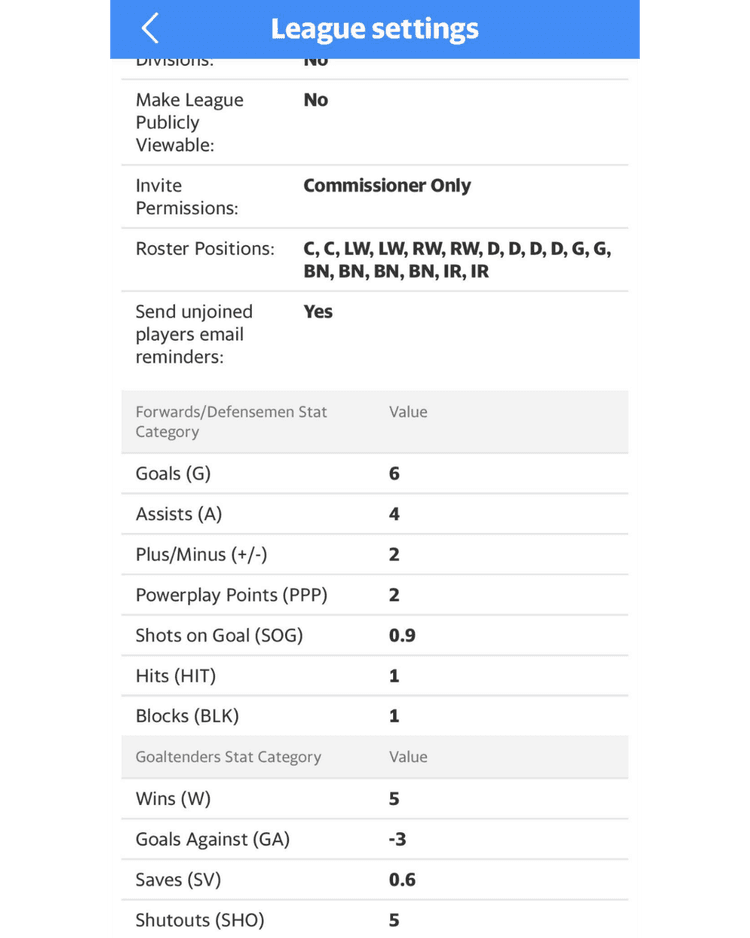
1. Know Your League Settings
Before you make any moves, check your league settings. Streaming strategy depends on:
- Adds per week (ex: 3, 4, 5, unlimited)
- Waiver type (daily waivers, FAAB, rolling, etc.)
- Lineup changes (daily vs weekly)
- Points vs categories
- Position limits (games caps, max starts, goalie minimums)
Quick tip: If you only have 3 adds per week, streaming is about maximizing value. If you have 5+ adds, it becomes a schedule + matchup weapon.
2. Look at Weekly Schedule
Not all games are equal.
A streamer only helps if you can actually start them. The best streamers play on light nights, nights where fewer games are on and your lineup is not full.
What to look for in the weekly schedule
Target teams that have:
- 4-5 games in the week (best case)
- multiple games on light-nights
- games on nights your roster is empty
New here? Read what streaming means in fantasy sports.
This works because if you add a player on a heavy night (when your roster is already full), you might not even be able to start them, so the move gets wasted. The rule of thumb is to stream for usable games, not just total games.
Our tool, EarlyBird Fantasy, lets you schedule your pickups ahead of time, so you can plan your streaming week properly without needing to be online at the exact right moment. This is especially useful when waivers clear early in the morning, when you are trying to chain multiple adds across the week, and when you want to lock in off-night games before your league mates react. If you want the full breakdown, see our pickup automation overview.
3. Choose Streamers With Role + Category Fit
Once you have identified the best schedules, pick players who actually have a reason to produce.
A good streamer usually has at least one of these:
- increased minutes / ice time lately
- moved up a line (L1/L2) or power play unit (PP1/PP2)
- strong shot volume, hits, blocks, or assists potential
- a role that matches your matchup needs
Points leagues
Focus on:
- minutes/ice time
- PP usage
- shot volume
- top-line deployment
Category leagues
Pick based on what you need to win:
- Shots / 3s / points
- Hits
- Blocks
- PPP
- Steals / stocks (basketball)
Quick tip: Do not stream a player just because they have 4 games. If their role is weak, you are buying empty volume.
4. Plan Your Adds Like a Mini Schedule (Don't Wing It)
The best streamers do not just add players, they plan a weekly "add path."
Example add plan (4 adds/week)
- Add #1 (Monday): Player from a team with Mon/Wed games
- Add #2 (Thursday): Swap to a player with Thu/Sat
- Add #3 (Saturday night): Swap to a player who plays Sat/Sun (back-to-back)
- Add #4 (Sunday): Final move to chase categories or stream a goalie matchup
This is how 4 moves can turn into 7-9 total streamed games instead of just 4.
Save one move when possible
Leave yourself flexibility for:
- injuries
- unexpected lineup changes
- last-day category swings
Avoid These Common Streaming Mistakes
- Streaming on heavy nights when you cannot start the player
- Dropping real long-term value just for a short schedule
- Using all your adds early and getting stuck if something changes
- Ignoring role/usage (minutes matter more than name value)
Advanced tiebreakers when two streamers look similar
Once you are using the 4-step process, most decisions become close. Use these tiebreakers to choose between similar options:
- Choose the player with more light-night starts, not more total games.
- Prefer role stability over short shooting spikes.
- Favor back-to-backs that fit your empty lineup days.
- In categories, prioritize scarce stats your roster lacks.
- Pick earlier game starts if you need flexibility for late swaps.
The difference between good and great streaming is not one huge move. It is winning these small tiebreakers every week.
End-of-week strategy (where matchups are won)
Friday through Sunday is where matchup context matters most. By this point you can see which categories are close, which are lost, and where one extra start changes the result.
If you are ahead comfortably in a category, avoid over-investing there. Redirect moves toward toss-up categories. If you are in a points format, maximize starts with the highest floor role players rather than chasing volatile boom outcomes.
Keep one add in reserve whenever possible. That final move is your response tool for sudden injuries, late scratches, surprise rest, or overtime category swings.
Streaming mindset: process over prediction
You do not need to predict every breakout perfectly. You need a repeatable process that turns waiver moves into usable starts. Over a season, process beats guesswork.
If your weekly routine includes rule checks, schedule mapping, role-based streamer selection, and planned add paths, your team will consistently generate more playable production than opponents who only react to headlines.
That is the real goal of streaming effectively: fewer wasted adds, more lineup-efficient games, and better odds to win close matchups.
Building your own streaming playbook
Once you are comfortable with the core method, document your own playbook. Keep a short note for each week with three items: which schedule pockets were most usable, which player archetypes worked best, and which mistakes cost you starts. This quickly reveals your highest-leverage habits.
A useful playbook usually includes a default add path and one contingency path. Default path covers normal schedule flow. Contingency path answers surprise injuries, late scratches, and category emergencies. If your league has tight add limits, this structure helps you avoid burning moves too early.
You can also define drop rules in advance. For example: never drop core role players; only drop medium holds for multi-game schedule advantage; rotate one designated stream slot aggressively. When these rules are pre-decided, your in-week decisions get faster and more consistent.
The final step is review discipline. At week end, grade execution instead of result only. You can make a strong process decision and still lose a short-term variance battle. Over time, the teams that follow reliable process tend to outperform teams that chase random hot streaks.
Quick weekly scorecard
Use a simple scorecard each week: number of adds used, number of active starts created, categories impacted, and number of wasted moves. This makes improvement measurable instead of subjective.
If your starts per add are rising and wasted moves are falling, your streaming process is improving. That is the outcome to chase over an entire season.
Consistent streaming is a competitive habit, not a one-week trick. Stay focused on startable games, role clarity, and matchup leverage. When those three factors guide your moves, your weekly floor rises and your close-matchup win rate usually improves.
More FAQs
- What is a fantasy pick up automator?
- How do I auto add players in yahoo fantasy?
- When is the best time to add players on yahoo fantasy?
- What are light nights in fantasy basketball?
- What are the best fantasy basketball tools?
- Fantasy Waiver Wire Tool (Free)
- What is the best streaming strategy for fantasy hockey?
- What are light nights in fantasy hockey?
- What is streaming in fantasy sports?
- How do I stream effectively in fantasy sports?